Device verification
Device verification is available for MDM enrolled Apple, Android, and Windows MDM devices. It combines four security and attestation technologies into a single KACE Cloud property that can be used to filter devices:
These four different technologies are
- Android Management API (AMAPI) Security Posture
- Android Play Integrity API
- Apple Managed Device Attestation
- Windows TPM Attestation
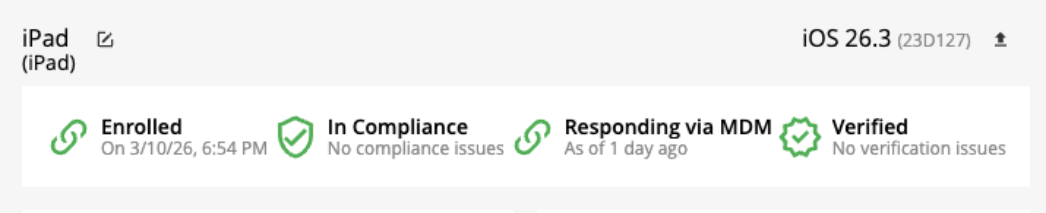
These technologies feed into the Verification Status field, which appears on both the device summary and device details pages. On the device summary page, the header shows the verification status. In the case below, the device has a verification status of Verified.
A summary chart displays the distribution of verification statuses for the currently selected devices.
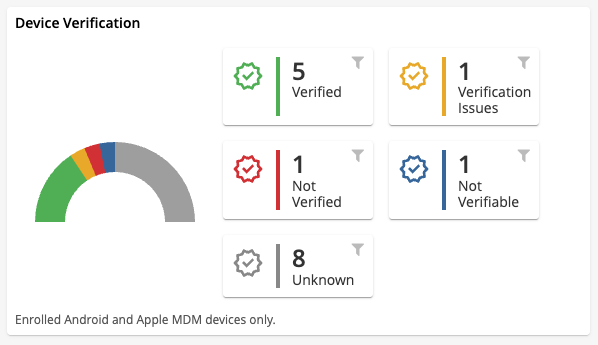
The Verification Status field can show one of six values:
- Not Applicable - Applies to devices that do not report verification information, such as registered (non MDM) devices.
- Unknown - The default value for devices capable of providing verification information but that have not yet done so.
- Not Verifiable - The device completed inventory but cannot provide verification data. This may occur with older Apple devices, Android EMM devices running outdated agent versions, or Windows devices that fail attestation due to unsupported hardware.
- Verified - The device returned valid verification information and meets the required standards.
- For Apple devices: the attestation certificate is correctly signed and contains the device’s serial number.
- For Android AMAPI devices: the device reports a Secure security posture.
- For Android EMM devices (Play Integrity): the device verdict is Meets Strong Integrity.
- For Windows 11 devices: the Azure Attestation report confirms all critical security properties are enabled. Devices that report only minor issues, such as HVCI, IOMMU, or VBS being disabled, also receive a Verified status.
- For Windows 10 devices: the Device Health Attestation report confirms all critical security properties are enabled. Devices that report only minor issues, such as ELAM or VSM being disabled, also receive a Verified status.
- Verification Issues - The device reports a lower integrity level than required.
- Applies to AMAPI At Risk posture or Play Integrity results such as Meets Device Integrity or Meets Basic Integrity.
- Apple devices do not have a corresponding intermediate state.
- For Windows devices: the attestation report indicates security concerns beyond minor issues.
- Not Verified - The device reports a failure condition.
- AMAPI marks the device as potentially compromised.
- Play Integrity cannot validate the device.
- Apple attestation is invalid or does not match the device.
- For Windows devices: attestation failed entirely.